How can I quit a game in progress?
Tapping on the game screen (above the piano keyboard) while a game is in progress will cause a big red X to appear. Tap this red X to immediately end the current game and return to the configuration screen. You might do this if you realize that you had the wrong scales selected or if the dragon's attack speed setting is too fast or too slow.
How can I access the Royal Conservatory of Music required scale lists for examinations?
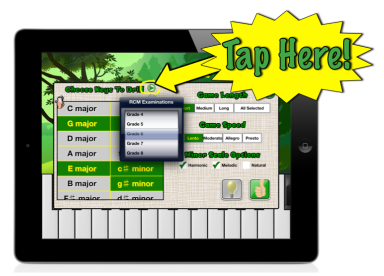
From the configuration screen, click on the green triangle next to "Choose Scales to Drill". A popup menu will appear allowing you to choose which grade (level) you wish to work on. After you choose, tap anywhere else on the screen to dismiss the popup menu, and you will find that the appropriate scale buttons have automatically been selected.